





We use Cookies!
Our website uses cookies. We use cookies to offer you a better browsing experience, analyze site traffic, personalize content, and serve targeted advertisements.
Learn more about how we use cookies and how to manage them by clicking "Cookie-settings".
[Content Banner Solutions]
Da Vinci LS Hydrogen Sensor Software
Optimize Hydrogen Leak detection with the Sensor Software
Constantly monitoring the Hydrogen concentration in the GC oven with a sensor ensures a safe use of Hydrogen in your laboratory. However, you can not constantly monitor your Hydrogen Sensor controller when you briefly step out of the lab.
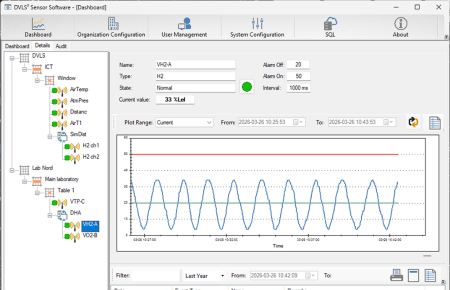
The Da Vinci LS Hydrogen Sensor Software is the ideal companion to the Da Vinci LS Hydrogen Sensor. The dedicated software configures, controls and monitors your Hydrogen Sensors and keeps you informed.
 |  |
Continuous Hydrogen leak monitoring in GC Oven
The Da Vinci LS Hydrogen Sensor provides a safe technique to detect a hydrogen leak in GC instruments. Installed in the GC oven, the sensor continuously monitors the hydrogen concentrations in the oven air. The sensor is controlled by dedicated Sensor Software to ensure safety in the laboratory.
The optional Da Vinci LS Hydrogen Sensor Software allows you to set up the system configuration, define alarm settings, manage users and create an audit trail.
The software can be used either stand-alone or in a network configuration. Configure the hardware by manually entering the sensor specifications or use the Device Scanning option to automatically scan for new sensor devices and add the specifications.
Manage your setup
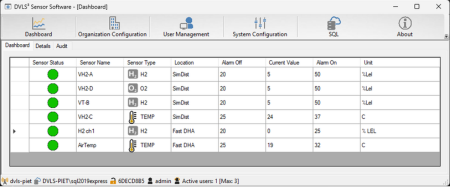
For each connected sensor, the dashboard displays:
- The location or instrument
- The detected H2 levels
- The minimum & maximum H2 levels
- Transmitted alerts
Manage the users, their access level and configure their email alerts in case of a hydrogen leak.
In case of a leak
In case the sensor detects a concentration that exceeds the user defined level the Da Vinci LS Hydrogen Sensor will automatically:
- Automatically switch the carrier gas to an inert gas (nitrogen);
- Send an automatic stop signal to the GC;
- Transmit an acoustic signal;
- Start flashing on the LCD screen.
The Hydrogen Sensor Software will
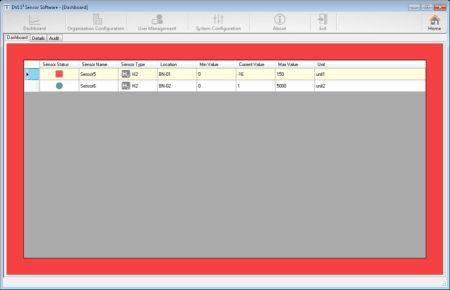
- Show a red status on the dashboard
- Display the detected values next to the minimum & maximum levels
- Show the transmitted alerts
And if configured the Sensor Software will send an email alert to the user(s).